
Back-office software built by a contractor, not a software company.
Estimating, crew time, job costing, invoicing, and a real set of books - built by a working steel fabricator who got fed up running his shop on QuickBooks. Now it runs his shop every day. Switching is painless: a one-click importer brings your QuickBooks data over, free.
Free through the beta. Founding testers lock in founder pricing for life. Your data is yours - export it any time.
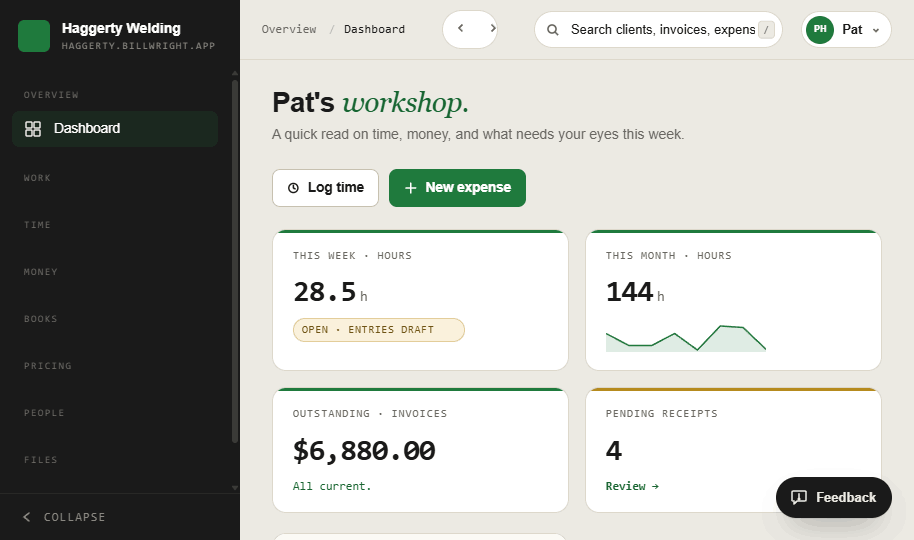
The real dashboard - v1.0.14, running on a live workspace.
I am Diego. I built this for my own shop.
billWright is not built by people guessing at how the trades work. I run FeC Ironworks, a working steel erector and fabricator, and I got tired of running it on QuickBooks plus a stack of apps that never fit. So I built the back office I actually needed - and it runs my shop every day: the estimates, the crew hours, the invoices, and the books.
Every feature has to hold up on a real job before it reaches you. That is the difference between software built for the trades and software built by them.

QuickBooks was never built for a job site.
It is fine for a coffee shop. On a construction job it falls apart, and you end up duct-taping it with classes, tags, and a pile of spreadsheets. billWright does the contractor parts natively - and a one-click importer brings your QuickBooks data over, free.
Change orders & retainage
QuickBooks has no real concept of either. You bolt them on with workarounds and hope the math holds. billWright tracks change orders against the job and holds retainage where it belongs.
Job costing that actually answers
Classes and tags are not job costing. billWright ties every estimate, crew hour, and receipt to the job, so you finally see profit per job - not just a company-wide profit and loss.
Progress & AIA billing
Progress billing and AIA-style draws are not in the box. billWright bills a week of work or a schedule of values without exporting to a spreadsheet first.
The one-click QuickBooks importer brings your chart of accounts and vendors straight across, free, and commits as a single transaction with a 24-hour undo - so a bad file can’t quietly corrupt your books. No data-entry weekend. See the full QuickBooks comparison.
From the first call to the day it’s marked paid.
Every job lives in one place. Quote it from numbers tuned to your shop, watch it move across the board, then bill it the moment the week of work closes - no spreadsheet, no shoebox, no re-typing.
See every deal in one view.
Quoted, accepted, in-flight, invoiced, paid - the whole pipeline on one board, with open quote value and in-flight work totalled at the top. Price each job with calculators built on your own materials, parts and labor rates, so the number you send is the number that holds.
Quote → job → invoice
One lane board tracks all nine deals from open quote to paid.
Calculators that know your numbers
Itemized, transparent, calibrated to your real costs - never a black box.
Send a no-login proposal
Clients open a clean, branded estimate in a browser and accept online.
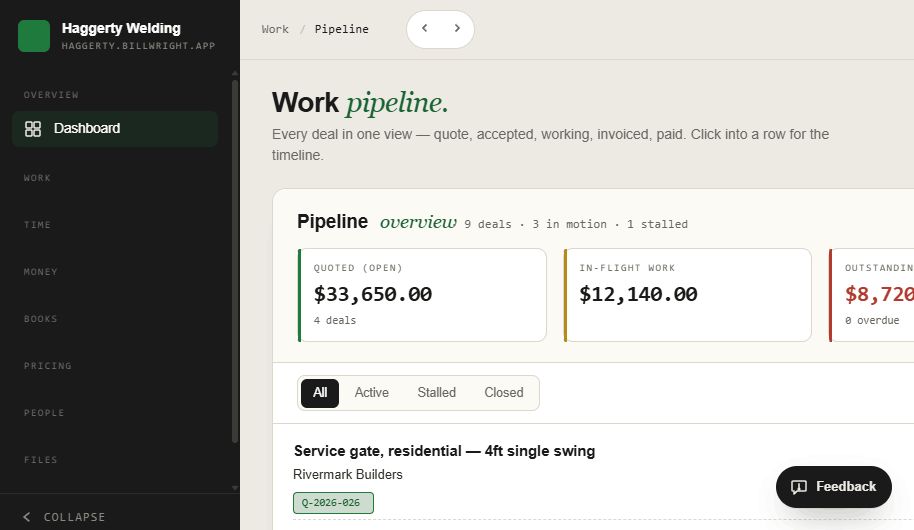
#/pipeline - nine deals, three in motion, one stalled.
Bill a week of work in one click.
Generate an invoice straight from a week of approved time, from an accepted quote, or from scratch - and every invoice carries its source, so you always know where the number came from. Filter by state or origin, record payments, and chase what’s past due.
Generate from a timesheet
Approved hours roll straight into a draft invoice.
Sourced & traceable
Every invoice is tagged timesheet, quote, or scratch.
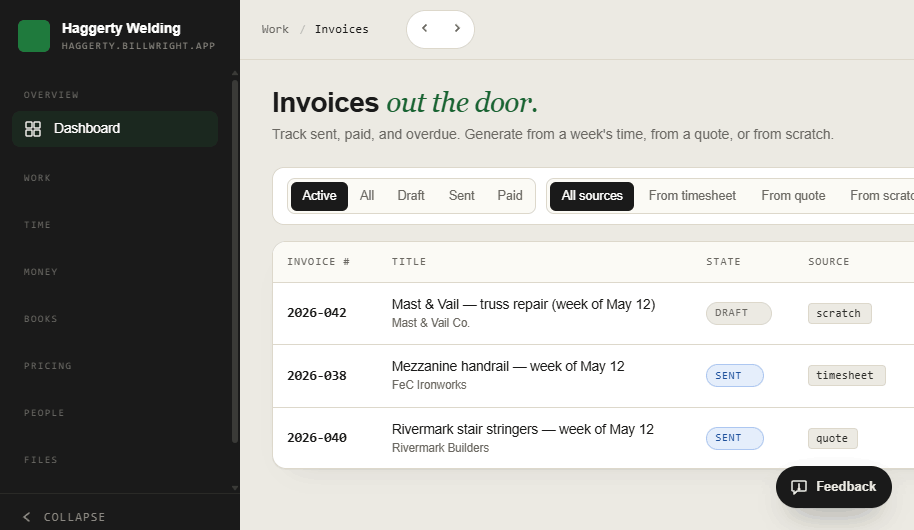
#/invoices - sent, paid, overdue, and where each one came from.
The field reports in. The books keep themselves.
Crew clock in from a phone with a PIN - no app store, no accounts. Receipts and bank activity land in one ledger that’s already coded for tax time. You confirm; billWright files.
Hours from the job site, on a phone.
The crew enter a PIN, pick the job, and submit the day in 15-minute steps with a mandatory attestation. Their hours land in your Verify queue; one pass approves a whole week, or sends a day back with a note. Photos and video upload with location and a timestamp, even when signal drops.
PIN clock-in app
Installs to the home screen, works offline, attestation required.
One-pass approval
Verify a week per person, or request changes with a note.
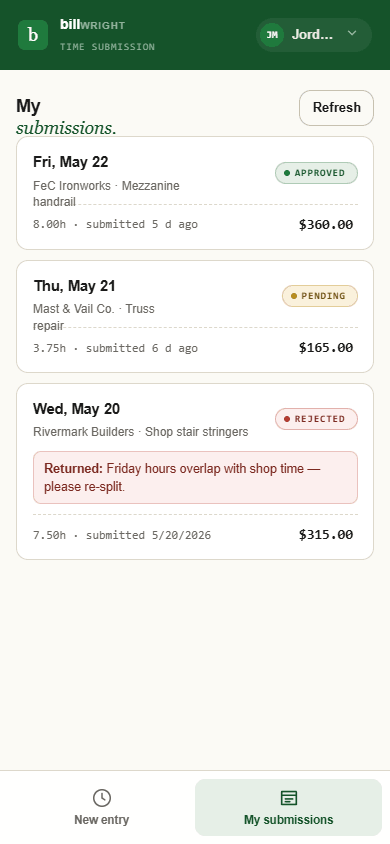
The crew’s phone - submit, then watch it clear.
Every dollar, coded and filed.
Switch on receipt scanning and the AI reads the vendor, amount and line items - with a confidence score on every guess - splitting a multi-item receipt across categories, each mapped to the right Schedule C line. Then you confirm: nothing hits your books until you say so. Prefer to keep it off? Key the lines in by hand - everything else works exactly the same.
AI scanning is opt-in
The only AI in billWright, off until you turn it on - and it only ever reads receipts.
Receipts & Schedule C
Line-item splits with COGS vs. Part II derived automatically.
Bank, cards & recurring
Connected activity, recurring bills, and owner-loan tracking in one ledger.
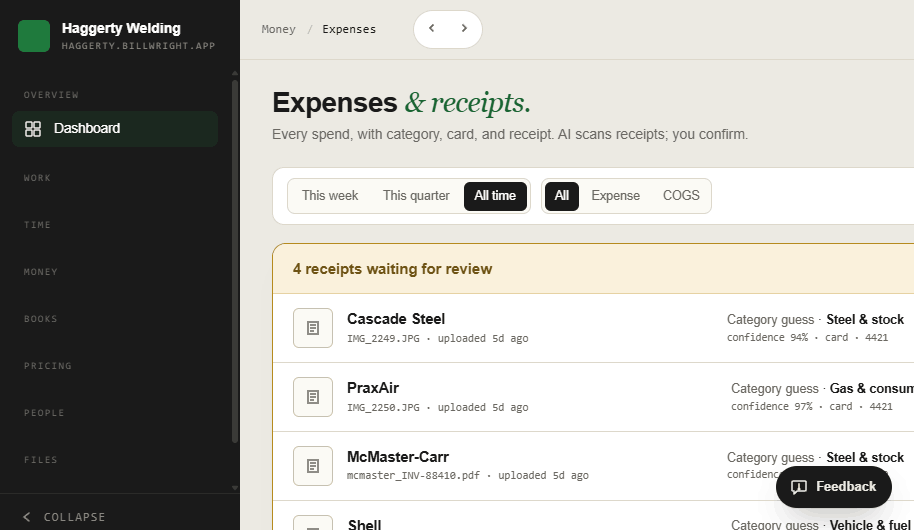
#/expenses - opt-in scanning reads it; you verify and post.
This isn’t just some AI app
AI does exactly one thing in billWright - read the receipts you choose to scan - and only once you turn it on. Everything else is plain, deterministic software you automate by hand. A powerhouse you command, not a black box you trust.
AI reads receipts. That’s all.
The one place billWright uses AI is parsing the receipts you snap, and it stays off until you switch it on in Settings. Even on, every read is a draft you verify - and your invoices, books, reports and command line never touch AI.
No lock-in, ever
One-click backups and a full CSV/JSON export. Imports commit as one transaction with a 24-hour undo, so a bad file can’t quietly corrupt your books.
Privacy by default
Crew location is event-only and owner-visible - captured at a clock-in or a photo, never in the background - with a clear notice the first time.
Run your whole shop from a command line.
Press Ctrl K anywhere and a CAD-style command line slides up from the bottom of the screen. Type to go to any screen, create an invoice, approve timesheets, or ask a question - “what am I owed?” - and read the answer right inside the strip, without leaving the page. It’s the fastest way through the app once it’s in your hands.
Go, Create, Action, Query
One bar for navigation, new records, bulk actions, and instant answers.
Records, inline
The same bar searches every job, client, invoice, quote and expense.
Live in app.html - press Ctrl K on any screen.
What’s here now - and what’s coming.
billWright already runs a shop end to end. Beta testers help steer what lands next. Here’s the honest state of the roadmap.
In v1.0.14, today.
In beta testers’ hands or in active build.
Planned, sequenced after the above.
An interactive timeline - filter by area and see what’s in testing right now.
Your books stay on your books.
We built billWright so your financial life lives in your own instance and goes nowhere you didn’t send it. Here’s exactly what we do with your data - and the one, optional door it can leave through.
None of this is sold, shared, brokered, or used to train anything. It sits in your workspace and leaves only when you export it.
you choose to scan Anthropic API Line items
read back to you
When receipt scanning is on, the receipt image you snap is sent to Anthropic’s API to read the vendor, amount and line items - and that is the only data that ever leaves our control. Your books, clients, bank data and the rest never go to any third party. Leave scanning off and nothing leaves at all; you just type the lines yourself.
Narrow by design
Only the receipt you scan goes out - not your customers, not your bank feed, not your totals. One optional image at a time, nothing in the background.
How Anthropic handles it
Anthropic does not train its models on data sent through its API, retains it only briefly for operations and abuse-prevention, then deletes it - over an encrypted connection.
Anthropic’s privacy policyAlways your call
Toggle scanning off whenever you like, and export everything to CSV/JSON in one click. There’s no lock-in and no quiet data collection to opt out of later.
A direct line to the person who builds it.
This isn’t a support queue or a chatbot. Join the beta and you get a real human on the other end - one who reads what you send, fixes bugs fast, and builds the features you actually ask for.
Reach a real person
Beta testers get a direct line - not a ticket number. Tell us what’s wrong or what you wish it did, and a human who knows the code writes back.
Bugs fixed ASAP
Something broken or in your way gets looked at right away - not parked behind a roadmap. Small shop, short path from “this is broken” to “it’s fixed.”
Your features, prioritized
The roadmap bends toward what beta testers value. If it helps you run the job and bill it, it moves up the list.
billWright isn’t answering to outside investors or a board chasing a quarterly number. The people it’s built for - the makers and builders actually using it - are the ones it answers to. Your feedback isn’t a data point in someone’s growth deck; it’s the thing that decides what gets built next.
Thinking about switching from
QuickBooks
See how billWright stacks up for a working contractor, side by side. Books built in, no lock-in.
Become a Founding Tester.
Join a small group of contractors shaping billWright before launch. It is free through the beta, and founding testers lock in founder pricing for life. Tell us about your shop and we will send an invite as spots open - and if you are on QuickBooks, a one-click importer brings your data over, free.
Application received.
Thanks - you’re on the list. Expect a call or text from the developer as beta spots open up.
Prefer email? Write us at hello@billwright.app - tell us your trade, crew size, and what you run on today.